docs
VaultKit



VaultKit is the policy layer between your production databases and anyone or anything that queries them — AI agents, engineers, and automated systems. Field-level masking, approval workflows, signed grants, and audit trails — without exposing raw credentials.
In 2026, an AI agent at PocketOS deleted an entire production database in nine seconds — backups included. The pattern is the same across incidents: agents and automated systems with raw database credentials and no policy enforcement layer. VaultKit fixes that.
What is VaultKit?
VaultKit provides enterprise-grade governance and security for data access, enabling AI agents, engineers, and automated systems to query multiple data sources through a unified, policy-controlled interface.
VaultKit is a control plane that governs how data is accessed across your organization. It centralizes authentication, authorization, policy evaluation, and access control — ensuring that every data request is properly authenticated, authorized, and audited before execution.
Core Responsibilities
- Authentication & Authorization: Identity verification and access control with RBAC/ABAC support
- Policy Evaluation: Fine-grained policies based on user attributes, data sensitivity, geographic regions, and time constraints
- Data Masking: Column-level masking rules (full, partial, hash) applied based on role and clearance
- Connection Management: Centralized datasource configuration and credential management
- Approval Workflows: Require explicit approval for accessing sensitive datasets
- Audit Logging: Complete, tamper-proof audit trail of every data access request
- Metadata Catalog: Automated dataset classification and schema discovery
- Session Tokens: Short-lived, cryptographically-signed tokens for Zero-Trust security
- Schema Governance: Git-backed policy bundles with drift detection for safe schema evolution
What is FUNL?
FUNL (Functional Universal Query Language) is the data plane and execution engine that powers VaultKit’s query capabilities. While VaultKit decides if and how data can be accessed, FUNL handles the actual execution.
Core Responsibilities
- AQL Translation: Converts VaultKit’s Abstract Query Language (AQL) into native query languages
- Multi-Engine Support: Executes queries against PostgreSQL, MySQL, Snowflake, BigQuery, and more
- SQL Masking Engine: Applies column-level masking at the SQL execution layer
- Query Execution: Handles parameterized queries with injection prevention
- Result Sanitization: Returns masked and filtered results back to VaultKit
- JWT Authentication: Only accepts cryptographically-signed requests from VaultKit
FUNL is designed to be lightweight, stateless, and horizontally scalable — making it ideal for high-throughput data access scenarios.
Security Guarantees
VaultKit is built with zero-trust governance and tamper-proof enforcement at its core:
- Grants carry cryptographically signed runtime constraints — every token includes a checksum over the policy bundle and authorization context
- Policy bundles are pinned to grants — if a bundle changes, previous grants are no longer valid
- Runtime constraints cannot be tampered with — policy constraints in the grant token are authenticated via digest
- Revocation kill switches exist for both individual grants and entire policy bundles, enabling emergency governance control
These characteristics go beyond traditional RBAC/ABAC systems and enable compliance-grade data access control.
Cryptographically Signed Grants
VaultKit issues short-lived, cryptographically signed access tokens (JWT) that embed:
- Policy bundle checksum — pins grant to exact policy version
- Runtime constraints — TTL, requester identity, datasource, allowed operations
- Grant identifiers — unique ID for audit trails and revocation
- Authorization context — role, clearance level, region, environment
Dual-Layer Verification
Tokens are verified at both the control plane (VaultKit) and execution plane (FUNL), ensuring:
- No policy tampering — bundle checksum enforced
- No grant reuse across orgs or bundles — org ID and bundle checksum embedded
- Detection of forged or replayed tokens — RSA signature + grant ID tracking
- Time-bound access — TTL enforced at both verification points
This enables credential-less execution — users and AI agents never handle database passwords, only time-bound, cryptographically-signed authorization tokens.
Architecture
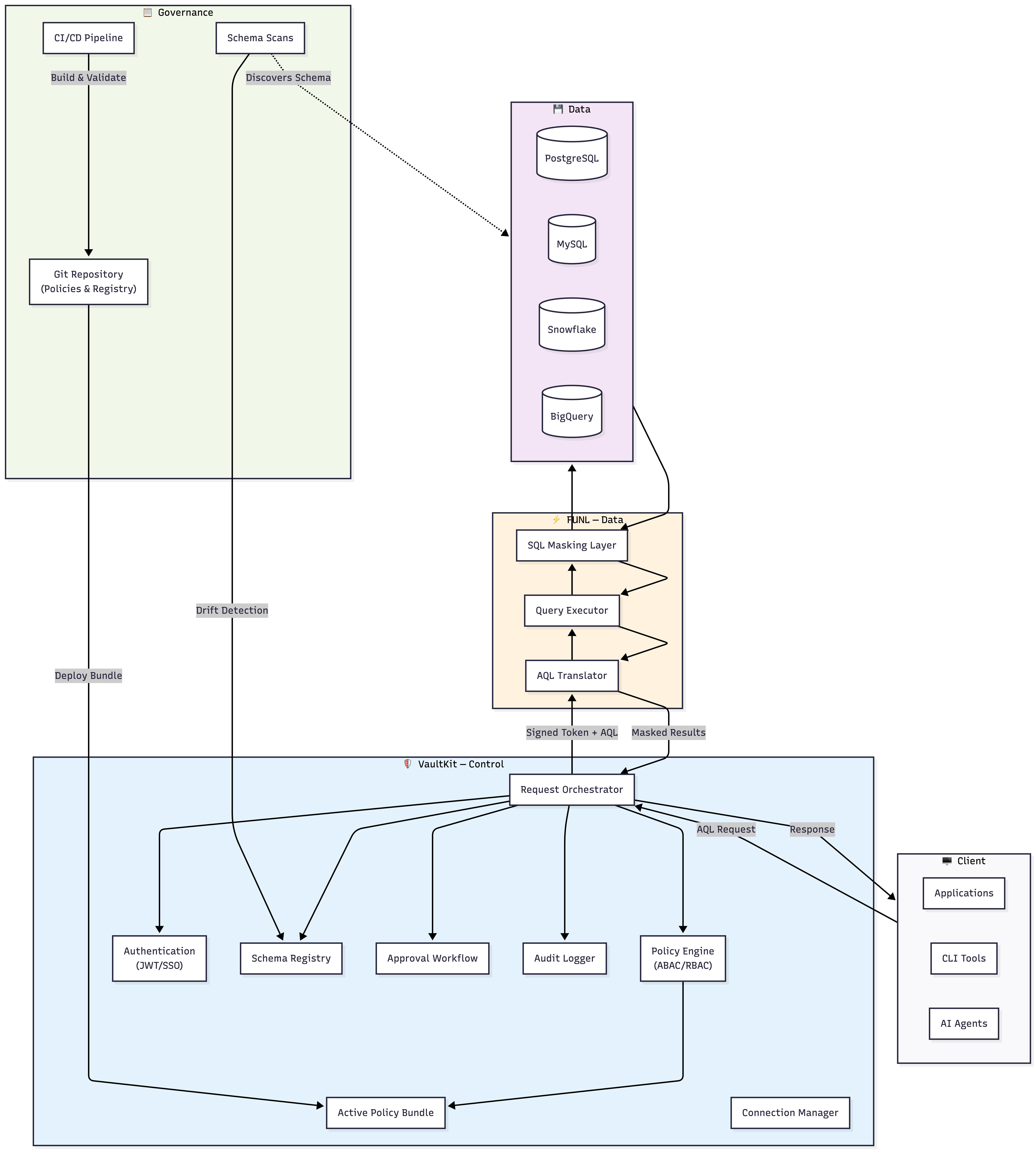
Component Breakdown
VaultKit (Control Plane)
- Request Orchestrator: Routes and manages the lifecycle of data access requests
- Policy Engine: Evaluates ABAC/RBAC rules with support for sensitivity levels, regions, and time constraints
- Policy Priority System:
deny>require_approval>mask>allow - Match Rules: Dataset-based, field sensitivity, categories, specific field names
- Context Awareness: User role, clearance level, region, environment, time windows
- Policy Priority System:
- Authentication Service: Handles user identity via JWT, OAuth, or SSO integration
- Schema Registry: Runtime database storing discovered schemas and serving as drift baseline
- Active Policy Bundle: Immutable, Git-backed artifact containing all enforcement rules
- Connection Manager: Manages datasource credentials (supports VaultKit store, HashiCorp Vault, AWS Secrets Manager)
- Approval Workflow: Implements multi-stage approval for sensitive data access
- Audit Logger: Records every request to pluggable sinks (SQLite, PostgreSQL, S3, etc.)
FUNL (Data Plane)
- AQL Translator: Parses AQL and generates engine-specific SQL with proper escaping
- Query Executor: Maintains connection pools and executes parameterized queries
- SQL Masking Layer: Injects masking functions into SELECT statements based on policy
- Engine Plugins: Extensible architecture for adding new database engines
Governance Layer
- Git Repository: Source of truth for all policies and dataset registries
- Schema Scans: Observational tooling that discovers database changes
- CI/CD Pipeline: Automated validation, bundling, and deployment of policy changes
Schema Discovery & Policy Management
VaultKit’s approach to schema evolution is designed for security, auditability, and safe change management.
The Core Philosophy: Intent vs. Reality
VaultKit deliberately separates:
- Policy Bundles (Intent) — Git-backed, immutable definitions of what should be allowed
- Schema Scans (Reality) — Observational discovery of what actually exists
This separation prevents silent data exposure. When new tables or sensitive columns appear, they require explicit policy review before access is granted.

Key Safety Principle:
Scans inform. Bundles enforce. Humans decide.
Scans never automatically update active policies. This ensures:
- No silent expansion of policy scope
- No auto-granting access to new sensitive data
- Full Git-based audit trail
- Compliance with SOC2, ISO 27001, GDPR, HIPAA
Quick Example: Handling Schema Drift
# 1. Discover schema changes (safe, read-only)
vkit scan production_db

# Output shows drift:
# + dataset: customers
#     + field: ssn (string) [PII]  NEW - requires policy
#     ~ field: email (text -> varchar) [PII] Already masked

# 2. Review and update baseline
vkit scan production_db --apply

# 3. Update policies in Git
vim policies/customer_data.yaml

# 4. Build and deploy new bundle
vkit policy bundle
vkit policy deploy
CI/CD Integration (Recommended)
name: Schema Drift Check
on: [schedule, push]
jobs:
  drift-detection:
    runs-on: ubuntu-latest
    steps:
      - name: Scan all datasources
        run: vkit scan --all --fail-on-drift

      - name: Create PR if drift detected
        if: failure()
        run: |
          vkit scan --all --diff > drift-report.md
          gh pr create --title "Schema Drift Detected" --body-file drift-report.md
AQL to Native Query Translation
AQL (Access Query Language) is a structured JSON format that describes what to fetch, not how. This abstraction allows VaultKit to enforce policies consistently across different database engines.
AQL Structure
{
  "source_table": "table_name",
  "columns": ["field1", "field2"],
  "joins": [],
  "aggregates": [],
  "filters": [],
  "group_by": [],
  "having": [],
  "order_by": null,
  "limit": 0,
  "offset": 0
}
Translation Examples
Simple Query:
{
  "source_table": "customers",
  "columns": ["email", "country", "revenue"],
  "filters": [
    { "field": "country", "operator": "eq", "value": "US" },
    { "field": "revenue", "operator": "gt", "value": 10000 }
  ],
  "limit": 100
}
FUNL Translation — PostgreSQL:
SELECT email, country, revenue
FROM customers
WHERE country = $1 AND revenue > $2
LIMIT 100
FUNL Translation — MySQL:
SELECT `email`, `country`, `revenue`
FROM `customers`
WHERE `country` = ? AND `revenue` > ?
LIMIT 100
SQL-Level Masking
FUNL’s Masking Dialect System applies transformations directly in SQL based on VaultKit’s policy decisions:
| Masking Type | PostgreSQL | MySQL | Snowflake |
|---|---|---|---|
| Full | '*****' AS email |
'*****' AS email |
'*****' AS email |
| Partial | CONCAT(LEFT(email, 3), '****') |
CONCAT(LEFT(email, 3), '****') |
CONCAT(LEFT(email, 3), '****') |
| Hash | ENCODE(SHA256(email::bytea), 'hex') |
SHA2(email, 256) |
SHA2(email, 256) |
Key Features
VaultKit (Control Plane)
| Feature | Description |
|---|---|
| AQL Orchestration | Vendor-neutral query language prevents SQL injection and enables policy enforcement |
| Policy Engine | Attribute-based access control with support for clearance levels, regions, sensitivity tags, and time windows |
| Policy Priority System | Hierarchical decision making: deny > require_approval > mask > allow |
| Field-Level Policies | Match rules based on dataset name, field sensitivity, categories (pii, financial, etc.), or specific field names |
| Context-Aware Rules | Policies evaluate requester role, clearance level, region, environment, and time constraints |
| Approval Workflows | Require manager/security approval for accessing PII, financial data, or production environments |
| Zero-Trust Sessions | Short-lived, cryptographically-signed tokens with automatic expiration |
| Credential Abstraction | Never expose database credentials to users — supports multiple secret backends |
| Git-Backed Governance | All policies and registries versioned in Git with full audit trail |
| Schema Drift Detection | Automated discovery of database changes with manual approval workflow |
| Comprehensive Auditing | Every query logged with user identity, timestamp, policy decisions, and results metadata |
| CLI & SDK | Rich command-line tools (vkit) and Python SDK for integration |
FUNL (Data Plane)
| Feature | Description |
|---|---|
| Multi-Engine Translation | Supports PostgreSQL, MySQL, Snowflake, BigQuery with identical AQL interface |
| SQL-Level Masking | Masking applied during query execution — no post-processing overhead |
| Injection Prevention | All queries use parameterized execution with proper type binding |
| Horizontal Scaling | Stateless design enables running multiple FUNL instances behind a load balancer |
| JWT Verification | Only executes queries signed by VaultKit’s private key |
Getting Started
Prerequisites
Before installing VaultKit, ensure you have:
- Ruby 3.1+ installed (
ruby --version) - Go 1.21+ installed (
go version) - OpenSSL for key generation
- Git for policy management
- Access credentials for at least one supported datasource
- (Optional) Docker for containerized deployment
Quick Start (Local Development)
The fastest way to get VaultKit running locally using Docker Compose:
1. Clone the repository
git clone git@github.com:vaultkit-inc/vaultkit.git
cd vaultkit
2. Create secrets
cp .env.example infra/secrets/.env
Edit infra/secrets/.env:
POSTGRES_USER=vaultkit
POSTGRES_PASSWORD=secret
POSTGRES_DB=vaultkit_development
DATABASE_URL=postgres://vaultkit:secret@postgres:5432/vaultkit_development
FUNL_URL=http://funl-runtime:8080
RAILS_ENV=development
3. Add signing keys
openssl genpkey -algorithm RSA -out infra/secrets/vkit_priv.pem -pkeyopt rsa_keygen_bits:2048
openssl rsa -pubout -in infra/secrets/vkit_priv.pem -out infra/secrets/vkit_pub.pem
4. Start VaultKit
cd infra
docker compose up --build
Services:
- Control Plane: http://localhost:3000
- FUNL Runtime: http://localhost:8080
- Postgres: localhost:5432
VaultKit is now running locally. You can now configure datasources and begin querying data through the control plane.
Quick Start (CLI-Based Setup — 5 Minutes)
1. Generate Cryptographic Keys
openssl genpkey -algorithm RSA -out vaultkit_private.pem -pkeyopt rsa_keygen_bits:2048
openssl rsa -pubout -in vaultkit_private.pem -out vaultkit_public.pem

export VKIT_PRIVATE_KEY="$(pwd)/vaultkit_private.pem"
export VKIT_PUBLIC_KEY="$(pwd)/vaultkit_public.pem"
export FUNL_PUBLIC_KEY="$(pwd)/vaultkit_public.pem"
Security Note: Keep your private key secure. Add
*.pemto your.gitignore.
2. Install VaultKit CLI
git clone https://github.com/vaultkit-inc/vaultkitcli.git
cd vaultkitcli
gem build vaultkitcli.gemspec
gem install ./vaultkitcli-0.1.0.gem

vkit --version
3. Install Python SDK
pip install vaultkit
4. Initialize & Connect
vkit login

vkit datasource add \
  --id demo_db \
  --engine postgres \
  --username readonly_user \
  --password $DB_PASSWORD \
  --config '{
    "host": "localhost",
    "port": 5432,
    "database": "analytics"
  }'

vkit scan demo_db --apply
5. Query Data
vkit request --datasource demo_db --aql '{
  "source_table": "users",
  "columns": ["id", "email", "created_at"],
  "limit": 10
}'

vkit fetch --grant grant_abc123xyz
You are now querying data through VaultKit.
Use Cases
1. Secure AI Agent Access
AI agents querying production databases inherit whatever permissions the underlying credential holds — and they will use all of it without hesitation. VaultKit replaces raw credentials with scoped, time-bound grants that enforce exactly what the agent is allowed to see.
The problem:
- AI agents operate with static credentials and overly broad permissions
- Prompt injection can redirect an agent to access data outside its intended scope
- There is no field-level control over what sensitive data the agent surfaces
- Audit trails show what was queried but not what data was actually returned
VaultKit solution:
# policies/ai_agent_restrictions.yaml
id: ai_agent_restrictions
match:
  fields:
    category: pii

context:
  requester_role: ai_agent
  environment: production

action:
  mask: true
  mask_type: hash
  reason: "PII must be hashed for AI agents"
  ttl: "15m"
How it works:
- AI agents receive short-lived session tokens (15 minutes)
- All PII fields automatically hashed before results return
- Agents can analyze patterns without accessing raw sensitive data
- Every query logged with AI agent identity, policy decision, and fields returned
CLI Usage:
vkit request \
  --datasource production_db \
  --role ai_agent \
  --aql '{
    "source_table": "customer_behavior",
    "columns": ["user_id", "email", "purchase_amount"],
    "filters": [{"field": "purchase_amount", "operator": "gt", "value": 1000}]
  }'

# Result: email field is hashed
# {
#   "user_id": 12345,
#   "email": "e3b0c44298fc1c149afbf4c8996fb92427ae41e4649b934ca495991b7852b855",
#   "purchase_amount": 1250.00
# }
2. Just-In-Time Access (Break-Glass)
Engineers and automated systems should never hold standing access to production data. VaultKit replaces standing privileges with time-bound, approval-gated grants that expire automatically and leave a verifiable audit trail.
The problem:
- Standing production access violates least-privilege
- Manual approval processes are slow and leave incomplete audit trails
- When something goes wrong, there is no verifiable record of who accessed what and why
VaultKit solution:
# policies/financial_requires_approval.yaml
id: financial_break_glass
match:
  fields:
    category: financial

context:
  environment: production
  requester_role: engineer

action:
  require_approval: true
  approver_role: finance_manager
  approval_metadata_required:
    - incident_ticket
    - business_justification
  ttl: "1h"
  reason: "Financial data access requires approval"
  auto_revoke: true
Approval Workflow:
# Engineer requests emergency access
vkit request \
  --datasource production_db \
  --approval-required \
  --reason "Investigating payment failure - Ticket INC-5432" \
  --metadata '{"incident_ticket": "INC-5432", "business_justification": "Payment processor reporting transaction mismatch"}' \
  --aql '{
    "source_table": "transactions",
    "columns": ["transaction_id", "amount", "status"],
    "filters": [{"field": "status", "operator": "eq", "value": "failed"}]
  }'

# Finance manager approves
vkit approval grant \
  --request-id req_20240115_xyz789 \
  --notes "Approved for incident resolution."

# Engineer fetches data
vkit fetch --grant grant_approved_abc123
Audit Trail Output:
{
  "request_id": "req_20240115_xyz789",
  "requester": "engineer@company.com",
  "requester_role": "engineer",
  "requested_at": "2024-01-15T16:00:00Z",
  "approved_by": "finance.manager@company.com",
  "approved_at": "2024-01-15T16:05:32Z",
  "access_expires": "2024-01-15T18:05:32Z",
  "queries_executed": 3,
  "rows_accessed": 147,
  "incident_ticket": "INC-5432",
  "auto_revoked": true
}
Audit Logging
Every query execution generates a signed audit record:
{
  "audit_id": "audit_20240115_abc123",
  "timestamp": "2024-01-15T16:30:45Z",
  "requester": {
    "user_id": "user_12345",
    "email": "analyst@company.com",
    "role": "analyst",
    "clearance_level": 2,
    "region": "US"
  },
  "request": {
    "datasource_id": "production_db",
    "dataset": "customers",
    "columns_requested": ["id", "email", "revenue"]
  },
  "policy_evaluation": {
    "policies_applied": [
      {
        "policy_id": "analyst_basic_access",
        "action": "mask",
        "fields_affected": ["email"],
        "mask_type": "partial"
      }
    ],
    "access_granted": true
  },
  "execution": {
    "execution_time_ms": 245,
    "rows_returned": 47
  },
  "metadata": {
    "grant_id": "grant_def789",
    "ttl_expires": "2024-01-16T00:30:45Z"
  }
}
Audit Sinks
audit:
  sinks:
    - type: postgres
      name: primary
    - type: s3
      name: archive
      bucket: audit-archive
      retention_days: 2555
    - type: webhook
      name: security_monitoring
      url: https://siem.company.com/events
CLI Reference
# Authentication
vkit login
vkit logout

# Datasource Management
vkit datasource add
vkit datasource list
vkit datasource test --id <id>
vkit datasource remove --id <id>

# Schema Discovery
vkit scan <datasource_id>
vkit scan --all
vkit scan <id> --apply
vkit scan <id> --diff

# Policy Management
vkit policy init --repo <path>
vkit policy validate
vkit policy bundle
vkit policy deploy
vkit policy list

# Data Access
vkit request
vkit fetch --grant <grant_id>
vkit cancel --grant <grant_id>

# Approvals
vkit approval list
vkit approval grant --request <id>
vkit approval deny --request <id>

# Audit
vkit audit query
vkit audit export

# Administration
vkit user list
vkit user create
vkit session list
vkit session revoke --id <session>
Security Best Practices
Key Management
DO:
- Store private keys in HSM or secure key management service
- Use separate key pairs for each environment
- Rotate keys regularly (recommended: quarterly)
DO NOT:
- Commit private keys to version control
- Share keys across environments
- Store keys in application code
Policy Design
DO:
- Follow principle of least privilege
- Use deny-by-default policies
- Implement approval workflows for sensitive data
- Set appropriate TTLs (shorter for production)
DO NOT:
- Use overly permissive wildcard policies
- Skip approval workflows in production
- Set TTLs longer than necessary
Deployment
DO:
- Use HTTPS/TLS for all communications
- Run FUNL in isolated network segments
- Enable audit logging to immutable storage
DO NOT:
- Expose FUNL directly to the internet
- Disable audit logging
- Store credentials in environment variables
Roadmap
Q2 2026
- BigQuery and Snowflake native support
- Web UI for policy management
- Enhanced approval workflows with multi-stage approvals
- Real-time audit log streaming
Q3 2026
- MongoDB and DynamoDB support
- Advanced analytics on audit logs
- Kubernetes operator for deployment
Q4 2026
- GraphQL query support
- Field-level encryption at rest
- ML-based anomaly detection
- Self-service data catalog
License
VaultKit is licensed under the Apache License 2.0. See LICENSE for details.
Support
- Documentation: https://docs.vaultkit.io
- CLI: https://github.com/vaultkit-inc/vaultkitcli
- Python SDK: https://github.com/vaultkit-inc/vaultkit-sdk-python
- Email: founders@vaultkit.io
Acknowledgments
VaultKit is built with and inspired by:
- Open Policy Agent - Policy engine inspiration
- HashiCorp Vault - Secret management patterns
- Trino - Federated query concepts
- Osquery - Security-first data access
Built with ❤️ by the VaultKit team